
Inventory Control Basics: The First Step to Improved Restaurant Profitability

Most restaurant operators view inventory management as a daunting, all-or-nothing project. There is a common misconception that unless you have entered every recipe and mapped them to the gram, you aren’t getting value out of an inventory system.
In reality, the highest Return on Investment (ROI) often comes from automating a few basic inventory processes. A simple shift towards automation and away from manual methods or trying to use spreadsheets can enable you to improve controls, save time, increase accuracy, and add new insights.

Full Inventory Item Detail
Standard accounting systems are designed to track what you owe a vendor, not what you actually bought. They see a $1,200 invoice from a broadline distributor; they don't see that the price of frying oil jumped 12%, or that you are using over 500 pounds of hamburger a month, or that a vendor substituted a higher-priced item.
By scanning and uploading invoices, you can easily capture the inventory line-item detail. This very simple and easy-to-implement process is the first step for transitioning from blind spending to detailed item purchase and usage tracking. It allows you to:
View and retain invoice images.
Automatically update your accounts payable system.
Identify significant price changes the moment they happen.
Monitor item cost trends.
Track purchase history by item and vendor.
Know that an item always reflects its most recent cost.
View and report actual usage for every inventory item.
In this example of a Line-Item Receiving Report, you can track purchases by vendor and by inventory item, for any selected date range, by simply scanning invoices. Invoice images are turned into the data you need to make smarter purchasing decisions.

Proactive Management via Cost Alerts
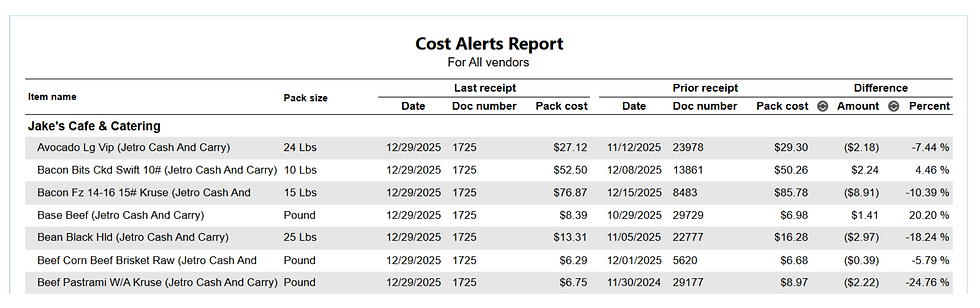
Another benefit resulting from tracking inventory purchases is Cost Alerts. Cost alerts flag when a significant price change for an item has occurred. They are generated in real-time and are also available via reports for a selected date range or vendor:
By setting a predefined price variance threshold, such as a 3% change, management can ignore stable costs and focus on immediate market spikes. This allows for adjustments before the month-end P&L is finalized.
Visualizing Cost Trends
Inventory management isn't just about tracking purchases; it's also about identifying patterns or trends. When line-item data is captured consistently, you can visualize cost trends over rolling periods. Trends help you better manage your vendors or realize the need to consider ingredient changes or substitutions.
This Cost Trend Analysis chart shows ingredient price volatility over time, which helps identify seasonal cycles or cost trends that can be used for more strategic decision-making.

Inventory Counts for Added Control
The next step toward added control is inventory counts. Generally Accepted Accounting Principles (GAAP), as well as most restaurant CPAs, recommend counting inventory periodically.

Periodic counts enable you to discover shrinkage, order more accurately, discourage theft, and calculate a more accurate cost of sales and operating profit. If you don’t count inventory, you don’t get credit on your P&L for inventory that you purchased or prepped but haven’t yet used.
As you can see here, Inventory Management systems make it easier to count inventory by organizing items by storage locations and enabling counts to be entered via a mobile device. They also ensure that the items and their costs are always up to date.
When your scanned invoice line-item detail is combined with an inventory count, an inventory system can calculate your actual usage for every inventory item. The basic formula is:
Beginning Count + Purchased Quantity - Ending Count = Actual Usage
The 2% Rule: Why the Basics Are Enough
Industry studies consistently show that restaurant operators can reduce their Cost of Goods Sold (COGS) as a percentage of sales by 2% or more simply by implementing basic inventory control - invoice processing, purchase tracking, and inventory counts.
For a restaurant doing $2 million in annual sales, a 2% reduction in COGS is $40,000 in pure bottom-line profit. This result is achievable immediately, whether recipes are added to the system or not. All that is required is the discipline of scanning invoices and performing regular periodic inventory counts.
Key Takeaway for Operators

Inventory management doesn't have to be a mountain to climb. By starting with invoice automation, you immediately move from reactive to proactive management.
By taking counts, you will have an accurate COGS on your P&L, and you will know your actual inventory usage at an item level. You gain the insights needed to protect your margins today, while building the foundation for full recipe management tomorrow.
Automate Invoice Processing
Monitor Line Item Purchase Quantities, Costs, and Trends
Perform Regular, Periodic, Inventory Counts


